
The QuickSwap app, explained tab by tab
There's no software to download for the core DEX — the QuickSwap "app" is the web interface you reach with a wallet. This is the honest, click-by-click tour of what each tab does and where the traps are.
Not the official QuickSwap siteThis is an independent educational guide. We are not affiliated with, endorsed by, or operated by QuickSwap, Polygon, or CEX.IO. The official DEX lives at quickswap.exchange — always verify links before connecting a wallet.What the "QuickSwap app" actually is
Let's clear up the biggest misconception first: for swapping tokens, there is nothing to install. The QuickSwap app is a website — a web interface that runs in your browser and connects to the Polygon blockchain through your crypto wallet. When people search for the "QuickSwap app," they almost always mean "how do I actually use the QuickSwap interface without making a mistake?" That's what this page answers.
This matters for security. Because the app is a website, the number-one risk isn't a bug in QuickSwap — it's landing on a fake QuickSwap that looks identical and is designed to drain your wallet. We'll hammer this point, because it's the one that actually loses people money.
Scammers buy search ads for "QuickSwap app" that lead to pixel-perfect clones. Always reach the app via the official quickswap.exchange domain, bookmark it, and check the address bar every single time before connecting your wallet.
Using QuickSwap on desktop
On a laptop or desktop, the flow looks like this:
Install a browser wallet
MetaMask and Rabby are the usual choices. They live as a browser extension and hold your keys locally. Add the Polygon network (most wallets prompt you automatically, or QuickSwap will offer to add it).
Open the official app
Go to your bookmarked quickswap.exchange and click "Launch App" / "Connect." A wallet pop-up asks you to approve the connection — this only shares your public address, never your keys.
Confirm the network
Make sure your wallet is set to Polygon. The app shows the active network in the header. Wrong network = nothing works (or worse, you transact somewhere unexpected).
Using QuickSwap on mobile (the right way)
Phones are where most beginners trip up, because a normal mobile browser (Safari, Chrome) can't talk to your wallet directly. The clean solution: use your wallet's built-in dApp browser.
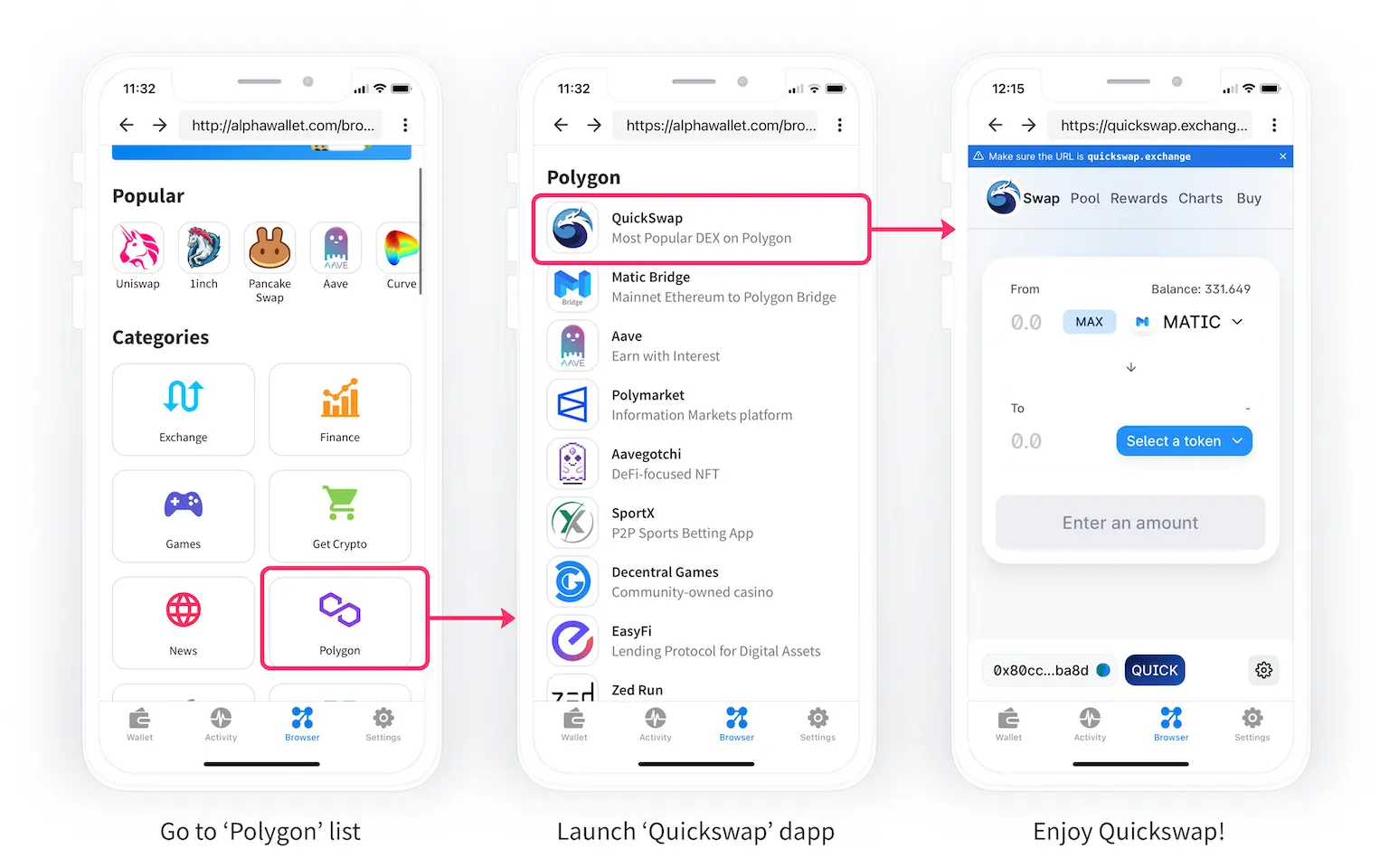
- Open your wallet app (MetaMask, Trust Wallet, etc.).
- Find the Browser or Discover tab inside the wallet.
- Type the official quickswap.exchange address (or pick QuickSwap from the curated Polygon dApp list if your wallet has one).
- The site connects automatically — the browser is inside your wallet, so there's no separate "connect" friction.
Golden rule for mobile: if any page ever asks you to "import" or "type" your 12/24-word seed phrase to use QuickSwap, close it immediately. The real app never needs your seed phrase.
Every tab, explained without the jargon
| Tab | What it does | Watch out for |
|---|---|---|
| Swap | Trade one token for another instantly. | Slippage on thin pairs; double-check the token contract address. |
| Pool / Pools | Add or remove liquidity to earn trading fees. | Impermanent loss; V3 positions need a price range (see below). |
| Rewards / Farms | Stake LP tokens or QUICK to earn extra rewards. | APRs are variable and often front-loaded; read the fine print. |
| Perps | Leveraged perpetual futures via an integrated partner.* | High liquidation risk; not for beginners. |
| Bridge | Move assets from other chains onto Polygon. | Use official bridges; confirm the destination network. |
| Buy | Fiat on-ramp (card/bank) via third-party providers.* | Third-party KYC and fees apply; compare rates. |
Your first swap, step by step
Pick "From" and "To" tokens
Select the token you're spending and the one you want. If a token isn't listed, you may need to paste its contract address — verify it from a trusted source first, because anyone can mint a fake "USDC."
Enter an amount and read the quote
The app shows the expected output, the price impact and the minimum received after slippage. If price impact is high, your pair is thin — reduce the size or reconsider.
Set a sane slippage tolerance
0.1–0.5% is fine for liquid pairs. Setting it very high invites sandwich bots to give you a worse price.
Approve (once) and confirm
The first time you trade a token, you sign a one-time "approve." Then confirm the swap. Both are wallet pop-ups — read them. Your tokens arrive in seconds on Polygon.
The fiat on-ramp (and why we'd often skip it)
QuickSwap's "Buy" tab lets you purchase crypto with a card or bank transfer via third-party providers.* It's convenient, but those providers run their own KYC and frequently charge higher spreads than a mainstream exchange. For larger amounts, many readers prefer to buy on a regulated platform and withdraw to Polygon. Whatever route you choose, compare the all-in rate, not just the headline fee.
Troubleshooting the four most common errors
"Transaction failed"
Usually too little gas (top up a little MATIC/POL) or slippage set too low for a moving market. Nudge slippage up slightly and retry.
"Insufficient liquidity"
The pair is too thin for your trade size. Split into smaller swaps or route through a major asset like USDC.
Token not showing
Add it by its verified contract address. Beware lookalikes — confirm the address from an official source.
Stuck / pending
On Polygon this is rare, but you can speed up or cancel a pending transaction from your wallet's activity screen by re-broadcasting with higher gas.
Staying safe inside the app
- Bookmark the real URL and never trust ads or DMs.
- Read every signature. "Approve unlimited" is convenient but risky — approve only what you need, and revoke old approvals periodically with a tool like a token-approval checker.
- Start with a tiny test transaction whenever you use a new feature or token.
- Keep a separate "hot" wallet with limited funds for daily DeFi, and a hardware wallet for savings.
The app never needs your seed phrase. Anyone or any page that asks for it is trying to rob you — close it instantly.
How to read a transaction before you sign it
This is the skill that separates people who keep their money from people who don't. Every time you confirm something, your wallet shows a pop-up describing what you're authorising. Slow down and read it. Here's what to look for:
- The action type. Is it a swap, an approval, or a generic "signature"? A swap should move the tokens you expect. A bare signature request from an unfamiliar site deserves real suspicion.
- The spending limit. Token approvals often default to "unlimited." For a one-off trade you can edit this down to the exact amount, so a compromised contract can't come back for the rest later.
- The contract address. Wallets like Rabby show you which contract you're interacting with and flag known-malicious ones. Use that information.
- The network and gas. Confirm you're on Polygon and that the gas estimate looks sane (it should be tiny). A surprisingly large gas fee can signal a problem.
A good habit: if you can't explain in one sentence what a signature does, don't sign it. The cost of pausing is a few seconds. The cost of signing blind can be your entire balance.
Beyond the basic swap: limit orders, DCA and charts
QuickSwap's interface has grown well past a simple swap box. A few features worth knowing about:
Limit orders
Set a target price and let the order fill when the market reaches it, rather than swapping at the current price. On a DEX these are powered by integrated partners and execute on-chain when conditions are met.*
DCA (dollar-cost averaging)
Automate recurring buys to smooth out volatility over time — a far saner approach for most people than trying to time the market with leverage.*
TradingView-style charts
The app integrates charting so you can read price history without leaving the page.* Useful context, but remember charts describe the past, not the future.
Analytics / Info
A separate analytics view shows pool liquidity, volume and token data. This is where you sanity-check whether a pair is deep enough to trade without heavy slippage.
Mobile or desktop: which is actually safer?
Neither is inherently safe or dangerous — what matters is your discipline. That said, the trade-offs differ:
| Desktop (browser extension) | Mobile (in-wallet browser) | |
|---|---|---|
| Convenience | Great for active sessions, bigger screen | Always in your pocket |
| Phishing surface | Fake extensions, malicious sites | Fake apps, smishing links |
| Hardware wallet | Easy to pair (Ledger via USB) | Possible but fiddlier |
| Best for | Larger trades, LP management | Quick swaps, checking balances |
Our suggestion: use desktop with a hardware wallet for anything significant, and treat the mobile experience as your "small amounts" environment. Keep both clean — no sketchy extensions, no pirated apps, OS and wallet always updated.
A realistic first session, start to finish
Here's what a careful first visit actually looks like, so nothing surprises you:
Arrive verified, connect, breathe
Open your bookmarked quickswap.exchange, connect your wallet, confirm Polygon. Nothing has cost you anything yet — connecting is free and harmless.
Do a deliberately tiny swap
Trade a dollar or two of USDC into another liquid token. Watch the approve-then-swap flow, see the tokens land, note the (microscopic) gas. Now you understand the mechanics with almost nothing at risk.
Swap back
Reverse the trade. You've now completed a full round trip and seen exactly how fees and slippage behaved. This five-minute exercise is the cheapest education in DeFi.
Only then scale up
Once the flow feels boring, you're ready for real amounts. Boredom is the goal — surprises are where losses live.
That's the whole philosophy of this guide in miniature: make every expensive action boring and familiar before the stakes are high. The app is fast and cheap enough on Polygon that practising costs almost nothing — so practise.
A plain-English glossary of app terms
The interface throws jargon at you. Here's a quick decoder so nothing intimidates you:
| Term | What it means in practice |
|---|---|
| Slippage tolerance | The maximum price change you'll accept between quote and execution. Too low = failed trades; too high = bad fills. |
| Price impact | How much your own trade moves the price. High impact means the pair is thin for your size. |
| Approve | A one-time permission letting the contract spend a specific token from your wallet. |
| Gas | The network fee paid to process your transaction — tiny on Polygon. |
| LP / liquidity | Depositing a token pair so others can trade against it; you earn a share of fees. |
| Wrapped token (e.g. WMATIC/WPOL) | A tradeable version of the native gas coin used inside many pools. |
| Route | The path your swap takes through one or more pools to get the best price. |
Keep this table handy for your first few sessions. Once these seven terms feel obvious, the entire QuickSwap interface stops looking like a cockpit and starts looking like what it is: a fast, cheap way to trade — with you, sensibly, in full control.